Showing posts with label devsecops. Show all posts

Monday, 24 November 2025

How to Install Snyk and Integrate It Into Jenkins CI for Secure Build Pipelines

How to Install Snyk and Integrate It Into Jenkins CI

DevSecOps Jenkins Snyk CI/CD

Modern CI/CD pipelines require security at every stage. Integrating Snyk into Jenkins CI helps detect vulnerabilities early and enforce DevSecOps practices efficiently.

In this guide, you’ll learn how to:

  • Install Snyk on Jenkins
  • Authenticate Snyk using Jenkins credentials
  • Scan your source code and dependencies automatically
  • Fail builds based on severity thresholds

1. Install Snyk CLI on Jenkins Server

Your Jenkins controller or agent must have the Snyk CLI installed to run scans.


# Download the Snyk CLI for Linux
sudo curl -L -o snyk-linux https://static.snyk.io/cli/latest/snyk-linux

# Download the snyk-to-html Linux binary from the official GitHub releases
sudo curl -L -o snyk-to-html-linux https://github.com/snyk/snyk-to-html/releases/latest/download/snyk-to-html-linux

chmod +x snyk-linux
chmod +x snyk-to-html-linux
sudo mkdir /opt/snyk
sudo mv snyk-linux /opt/snyk
sudo mv snyk-to-html-linux /opt/snyk

Verify:


/opt/snyk/snyk-linux --version
/opt/snyk/snyk-to-html-linux --help

2. Get Your Snyk API Token

  1. Log in at https://snyk.io
  2. Go to Account Settings
  3. Copy your personal Snyk API token


3. Add Snyk Token to Jenkins Credentials

  1. Go to Manage Jenkins → Credentials
  2. Choose Global credentials
  3. Click Add Credentials
  4. Choose: Secret text
  5. Paste your Snyk API token
  6. Set ID to: snyk-token


4. Integrate Snyk Into Freestyle Jobs

Install Plugin

  1. Manage Jenkins → Manage Plugins → Available
  2. Search: Snyk Security
  3. Install


Add Scan Step

  • Edit your Freestyle job
  • Add build step → Invoke Snyk Security
  • Select:
    • Snyk installation → snyk
    • Token credential → snyk-token

Optional flags:


--severity-threshold=medium
--all-projects


5. Jenkins Pipeline (Jenkinsfile) Integration

Here is a ready-to-use Jenkinsfile:


pipeline {
    agent any

    environment {
        SNYK_TOKEN = credentials('snyk-token')
    }

    stages {
        stage('Checkout') {
            steps {
                checkout scm
            }
        }

        stage('Authenticate Snyk') {
            steps {
                sh 'snyk auth $SNYK_TOKEN'
            }
        }

        stage('Snyk Dependency Scan') {
            steps {
                sh 'snyk test --severity-threshold=medium'
            }
        }

        stage('Snyk Code Scan') {
            steps {
                sh 'snyk code test --severity-threshold=medium || true'
            }
        }

        stage('Build App') {
            steps {
                sh './mvnw clean package || mvn clean package'
            }
        }
    }
}

6. Fail Builds on Vulnerabilities

Fail on high severity:


snyk code test --severity-threshold=high

Fail on critical dependency issues:


snyk test --severity-threshold=critical

RUN YOUR BUILD AND YOU WILL SEE THE REPORT OF ALL VULNERABILITIES > BUILD SHOULD SUCCEED IF THERE ARE NO VULNERABILITIES

Below is a Vulnerable POM.xml

This version includes:

🔥 Critical known vulnerabilities:

  • Log4j 1.x (CVE-2019-17571)

  • Spring Framework 4.x RCE (CVE-2016-1000027)

  • Jackson Databind insecure version (CVE-2017-17485, CVE-2019-12384)

Every one of these is easily detected by Snyk. UPDATE YOUR POM.XML IN YOUR PROJECT WITH THE ONE BELOW.


<project xmlns="http://maven.apache.org/POM/4.0.0"

         xmlns:xsi="http://www.w3.org/2001/XMLSchema-instance"

         xsi:schemaLocation="http://maven.apache.org/POM/4.0.0 http://maven.apache.org/maven-v4_0_0.xsd">


    <modelVersion>4.0.0</modelVersion>

    <groupId>com.mkyong</groupId>

    <artifactId>Facebook</artifactId>

    <packaging>war</packaging>

    <version>1.2.${v}-SNAPSHOT</version>

    <name>MyWebApp Maven Webapp</name>


    <dependencies>


        <!-- ❌ Critical vulnerability (Log4Shell family) -->

        <dependency>

            <groupId>log4j</groupId>

            <artifactId>log4j</artifactId>

            <version>1.2.17</version>

        </dependency>


        <!-- ❌ Known RCE in older Spring Framework -->

        <dependency>

            <groupId>org.springframework</groupId>

            <artifactId>spring-core</artifactId>

            <version>4.3.0.RELEASE</version>

        </dependency>


        <!-- ❌ Jackson Databind insecure version (multiple CVEs) -->

        <dependency>

            <groupId>com.fasterxml.jackson.core</groupId>

            <artifactId>jackson-databind</artifactId>

            <version>2.8.4</version>

        </dependency>


        <!-- Old JUnit already present — keep it -->

        <dependency>

            <groupId>junit</groupId>

            <artifactId>junit</artifactId>

            <version>3.8.1</version>

            <scope>test</scope>

        </dependency>


    </dependencies>


    <build>

        <finalName>MyWebApp</finalName>

    </build>


</project>


Conclusion

Integrating Snyk into Jenkins CI provides automated security scanning, early vulnerability detection, and real DevSecOps pipeline enforcement. The free tier also makes it excellent for DevOps coaching and hands-on labs.


Tuesday, 14 June 2022

Security- Securing You Application

Who is the OWASP® Foundation?

The Open Web Application Security Project® (OWASP) is a nonprofit foundation that works to improve the security of software. Through community-led open-source software projects, hundreds of local chapters worldwide, tens of thousands of members, and leading educational and training conferences, the OWASP Foundation is the source for developers and technologists to secure the web.


The OWASP Top 10 is a standard awareness document for developers and web application security. It represents a broad consensus about the most critical security risks to web applications.

Globally recognized by developers as the first step towards more secure coding.

Companies should adopt this document and start the process of ensuring that their web applications minimize these risks. Using the OWASP Top 10 is perhaps the most effective first step towards changing the software development culture within your organization into one that produces more secure code.

Top 10 Web Application Security Risks

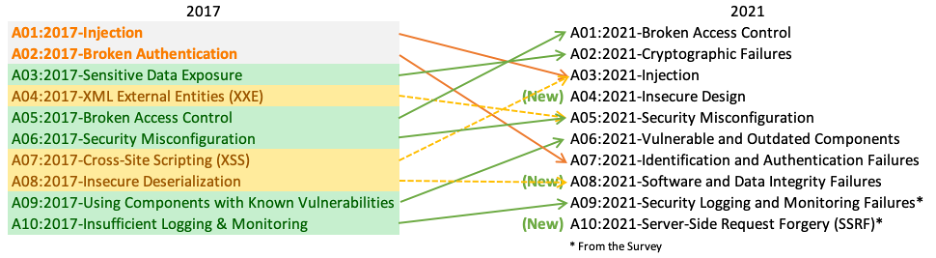
There are three new categories, four categories with naming and scoping changes, and some consolidation in the Top 10 for 2021.

Mapping

  • A01:2021-Broken Access Control moves up from the fifth position; 94% of applications were tested for some form of broken access control. The 34 Common Weakness Enumerations (CWEs) mapped to Broken Access Control had more occurrences in applications than any other category.
  • A02:2021-Cryptographic Failures shifts up one position to #2, previously known as Sensitive Data Exposure, which was broad symptom rather than a root cause. The renewed focus here is on failures related to cryptography which often leads to sensitive data exposure or system compromise.
  • A03:2021-Injection slides down to the third position. 94% of the applications were tested for some form of injection, and the 33 CWEs mapped into this category have the second most occurrences in applications. Cross-site Scripting is now part of this category in this edition.
  • A04:2021-Insecure Design is a new category for 2021, with a focus on risks related to design flaws. If we genuinely want to “move left” as an industry, it calls for more use of threat modeling, secure design patterns and principles, and reference architectures.
  • A05:2021-Security Misconfiguration moves up from #6 in the previous edition; 90% of applications were tested for some form of misconfiguration. With more shifts into highly configurable software, it’s not surprising to see this category move up. The former category for XML External Entities (XXE) is now part of this category.
  • A06:2021-Vulnerable and Outdated Components was previously titled Using Components with Known Vulnerabilities and is #2 in the Top 10 community survey, but also had enough data to make the Top 10 via data analysis. This category moves up from #9 in 2017 and is a known issue that we struggle to test and assess risk. It is the only category not to have any Common Vulnerability and Exposures (CVEs) mapped to the included CWEs, so a default exploit and impact weights of 5.0 are factored into their scores.
  • A07:2021-Identification and Authentication Failures was previously Broken Authentication and is sliding down from the second position, and now includes CWEs that are more related to identification failures. This category is still an integral part of the Top 10, but the increased availability of standardized frameworks seems to be helping.
  • A08:2021-Software and Data Integrity Failures is a new category for 2021, focusing on making assumptions related to software updates, critical data, and CI/CD pipelines without verifying integrity. One of the highest weighted impacts from Common Vulnerability and Exposures/Common Vulnerability Scoring System (CVE/CVSS) data mapped to the 10 CWEs in this category. Insecure Deserialization from 2017 is now a part of this larger category.
  • A09:2021-Security Logging and Monitoring Failures was previously Insufficient Logging & Monitoring and is added from the industry survey (#3), moving up from #10 previously. This category is expanded to include more types of failures, is challenging to test for, and isn’t well represented in the CVE/CVSS data. However, failures in this category can directly impact visibility, incident alerting, and forensics.
  • A10:2021-Server-Side Request Forgery is added from the Top 10 community survey (#1). The data shows a relatively low incidence rate with above average testing coverage, along with above-average ratings for Exploit and Impact potential. This category represents the scenario where the security community members are telling us this is important, even though it’s not illustrated in the data at this time.


Security Vulnerability Scanner ZAP

Zed Attack Proxy (ZAP) is a free and open-source web application security scanning tool developed by OWASP, a not-for-profit organization working to enhance the security of software applications. This tool is ideal for beginners to start security testing of web applications as it is easy to use, and installation is also quite easy. Although, these tools used by penetration testing professionals also. I feel that the ZAP tool is ideal for developers and functional testers to automate their applications' security testing. You can also use other tools like Selenium with ZAP to automate testing.

 Docker

Best practices for scanning images

This page contains recommendations and best practices for scanning and building secure images.

Docker and Snyk have partnered together to bring security natively into the development workflow by providing a simple and streamlined approach for developers to build and deploy secure containers. Container security spans multiple teams - developers, security, and operations. Additionally, there are multiple layers of security that apply to containers:

  • The container image and the software running inside
  • The interaction between a container, the host operating system, and other containers on the same host
  • The host operating system
  • Container networking and storage

Including the vulnerability scanning options into the Docker platform extends the existing, familiar process of vulnerability detection, and allows for remediation of vulnerabilities earlier in the development process. The process of simple and continuous checks, for example, by checking images in the background using Snyk Advisor, can lead to fewer vulnerabilities checked into Docker Hub. This can result in a shorter CI cycle and a more reliable deployment into production.

Developer's security journey

Scanning images

Log4j 2 CVE-2021-44228

Versions of docker scan earlier than v0.11.0 are not able to detect Log4j 2 CVE-2021-44228. You must update your Docker Desktop installation to version 4.3.1 or higher to fix this issue. For more information, see Scan images for Log4j 2 CVE.

You can trigger scans automatically by pushing an image to Docker Hub. You can achieve this either through the docker scan command in the CLI, or through Docker Hub.

Scan using the CLI

After you’ve built an image and before you push your image to Docker Hub, run the docker scan command. For detailed instructions on how to scan images using the CLI, see docker scan.

Docker Scan CL

Scan using Docker Hub

You can trigger scans, view, and inspect vulnerabilities through Docker Hub. For detailed information, see Hub Vulnerability Scanning.

Note

Docker Hub Vulnerability Scanning is available for developers subscribed to a Docker Pro, Team, or a Business tier. For more information about the pricing plans, see Docker Pricing.

Hub Vulnerability scanning

View the scan summary in Docker Desktop

Docker Desktop provides you a snapshot of your vulnerabilities status on the Docker Dashboard. Hover over the image and click View in Hub to view a detailed vulnerability report in Docker Hub.

Hub Vulnerability scan summary


git-secrets

Prevents you from committing passwords and other sensitive information to a git repository.

https://betterprogramming.pub/how-you-can-prevent-committing-secrets-and-credentials-into-git-repositories-adffc25c2ea2


Git hooks are scripts that run automatically every time a particular event occurs in a Git repository. They let you customize Git’s internal behavior and trigger customizable actions at key points in the development life cycle.

Hooks executing during the commit creation process

Common use cases for Git hooks include encouraging a commit policy, altering the project environment depending on the state of the repository, and implementing continuous integration workflows. But, since scripts are infinitely customizable, you can use Git hooks to automate or optimize virtually any aspect of your development workflow.


Bash Script to Install Artifactory in Ubuntu 22

JFrog Artifactory OSS 7.21.5 — Install (Bash Script) This script installs Artifactory OSS (no Docker, no Pro, works on Ubuntu 22 EC2). ...